
Gaming has evolved into a competitive and immersive hobby for millions of people worldwide. Whether you’re taking part in an esports tournament or enjoying a casual solo adventure, gaming can easily turn into a long session that stretches for hours. However, with prolonged gaming sessions comes the risk of developing physical strain, particularly in your back, neck, wrists, and shoulders. One of the best ways to prevent discomfort and injury is to maintain good posture throughout your gaming experience.
Why Good Posture Matters for Gamers
Sitting for extended periods without proper posture can lead to a range of health issues, including muscle fatigue, back pain, and repetitive strain injuries. Poor posture can also cause discomfort in the neck, wrists, and even headaches. By focusing on your posture, you can minimize the risk of these physical problems and enjoy gaming without compromising your health.
Tips for Maintaining Good Posture
1. Set Up Your Gaming Chair Properly
Your gaming chair is your main source of support during long sessions. It should provide lumbar support for your lower back, keeping your spine aligned. Here’s how to make the most out of your chair:
- Adjust the Chair Height: Your feet should rest flat on the floor with your knees at a 90-degree angle. If your chair is too high or too low, it will place strain on your legs and lower back.
- Use Lumbar Support: Ensure your chair provides good support for your lower back, or consider using a cushion for extra support. This will help keep your spine in a neutral position, preventing back pain.
- Armrests: Adjust the armrests to ensure your arms are at a 90-degree angle when using your gaming mouse and keyboard. This will prevent strain on your shoulders and wrists. To improve your reaction time in games, read our tips for quick and accurate responses.
2. Position Your Monitor at Eye Level
One of the most common mistakes gamers make is looking down or craning their necks to see the screen. This can lead to neck strain and discomfort. Follow these steps to optimize your screen position:
- Eye-Level Monitor Placement: Position your monitor so that the top of the screen is at or slightly below your eye level. You should be able to look straight ahead without tilting your head up or down.
- Proper Distance: The monitor should be at a comfortable viewing distance—typically around 20 to 30 inches from your eyes. This prevents eye strain and helps reduce the risk of developing computer vision syndrome.
3. Keep Your Arms and Wrists in a Neutral Position
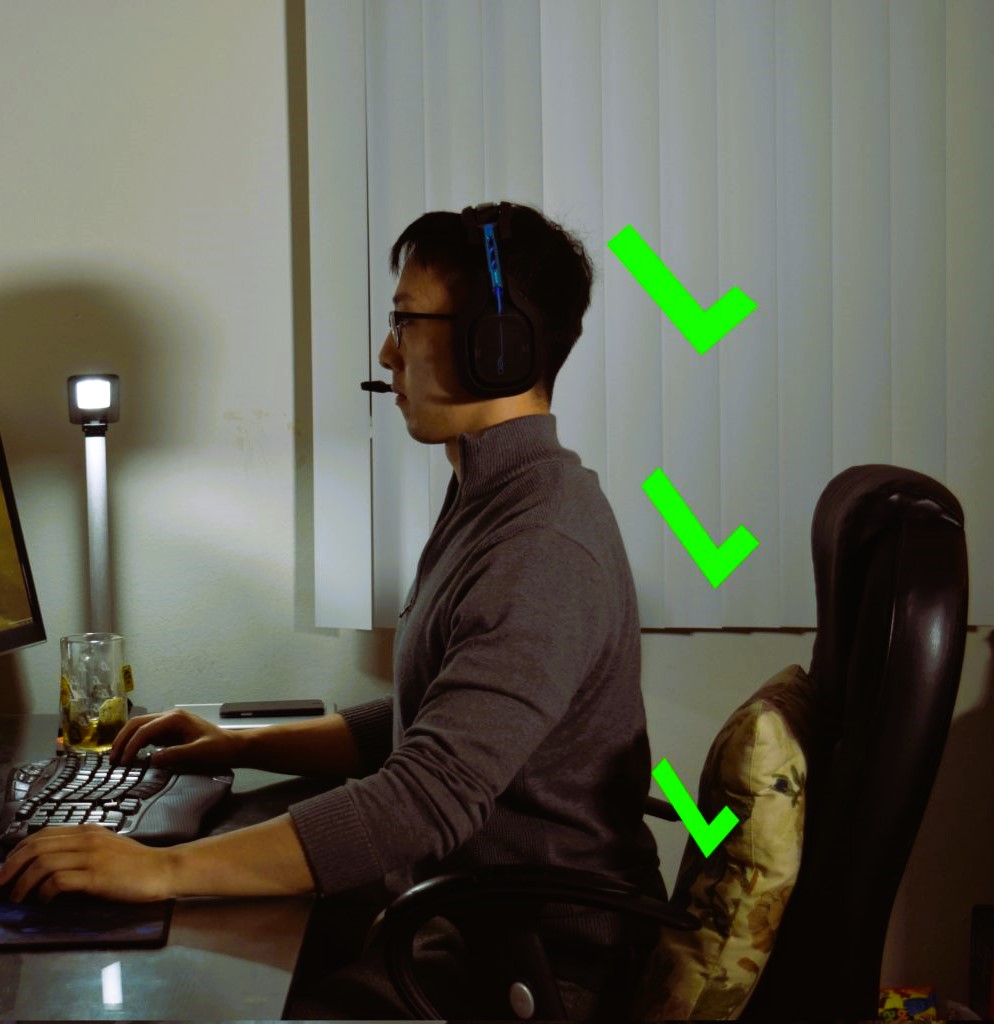
Your arms and wrists play a crucial role in controlling your character and interacting with the game. Keeping them in the right position is key to preventing strain:
- Use an Ergonomic Keyboard and Mouse: Choose gaming equipment that promotes a natural wrist position. Look for a keyboard with a slight tilt, or opt for an ergonomic keyboard that encourages a more neutral wrist angle. Gaming mice with adjustable DPI settings can help minimize hand movement, reducing strain on your wrist.
- Keep Your Wrists Straight: Avoid bending your wrists too much, either up or down, while typing or using your mouse. Wrists should be in a straight line with your forearms to avoid discomfort and potential injuries like carpal tunnel syndrome.
4. Take Breaks and Stretch
Even the best posture won’t prevent muscle fatigue if you remain seated for hours on end without moving. Taking regular breaks is essential for your health:
- The 20-20-20 Rule: Every 20 minutes, look away from your screen and focus on something 20 feet away for at least 20 seconds. This gives your eyes a break and prevents eye strain.
- Stretching: Stand up, stretch your arms, neck, and back every 30 to 60 minutes. Simple stretches like shoulder rolls and wrist stretches can alleviate tension and improve circulation.
5. Maintain Good Posture While Gaming
When you’re gaming, it’s easy to fall into bad habits, such as slouching or leaning forward. To combat this:
- Sit Back in Your Chair: Keep your back straight and your shoulders relaxed, not hunched. Avoid slouching or leaning forward, as this can lead to muscle strain.
- Core Engagement: Engage your core muscles while sitting. This will help stabilize your posture and reduce the risk of lower back pain.
Maintaining good posture during long gaming sessions is not just about comfort—it’s also about protecting your long-term health. By adjusting your gaming setup, using ergonomic equipment, and taking regular breaks, you can enjoy your gaming sessions while minimizing physical strain.
For more information on the importance of good posture, check out Wikipedia’s article on Posture.